Keep the farm in order.
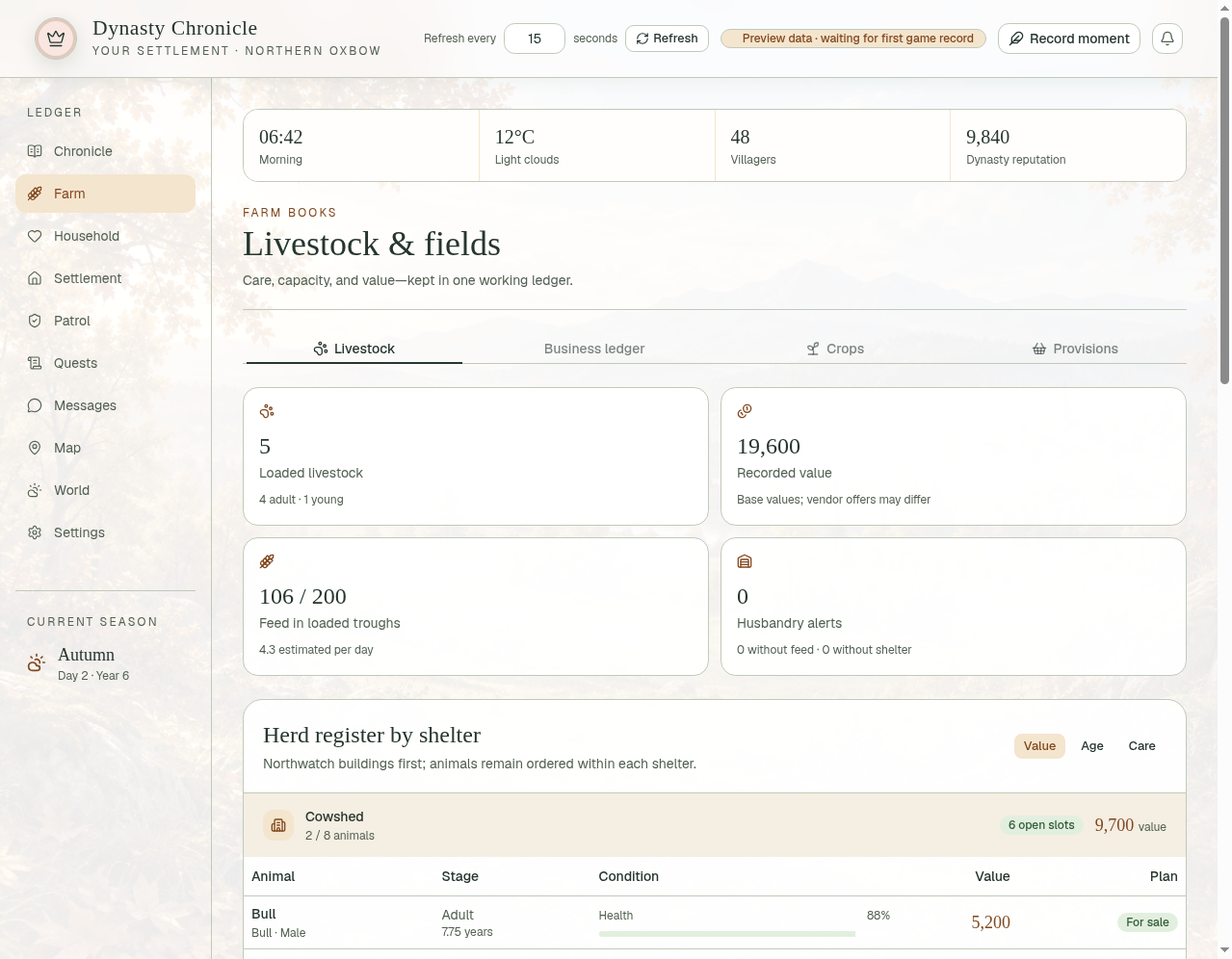
Review livestock, shelter capacity, feed, and keep/breed/sell plans. Recorded values are not guaranteed vendor offers.

Free software / Medieval Dynasty companion
Your settlement. Your stories.
One living chronicle.
A free, unofficial Medieval Dynasty companion for keeping track of your livestock, villagers, settlement stores, and the stories that grow around them.
Created by: SyncroTel Labs, LLC.
0.2.0-beta.2 · Windows x64 & Linux x64 · Free for personal use · As-is beta
A place for your village’s story
Review livestock, shelter capacity, feed, and keep/breed/sell plans. Recorded values are not guaranteed vendor offers.
Follow available villager details and family relationships. Add chronicle-only surnames and Great Houses without renaming characters in your game.
Review available settlement stores, staffing, production issues, and repairs. Build shopping lists for your kitchen and tavern.
Keep journal entries and exchange fictional letters. Built-in responses work without an extra download or account.
Use your last recorded settlement while the game is offline. Fresh installations show demonstration data until a game snapshot is available.
Open the desktop app or a paired tablet dashboard on your trusted home network. The game still runs on your PC.
Free downloads
Get the complete installer package, or just the installer for your computer. No checkout, account, or donation required.
Both platforms
0.2.0-beta.2 · 241.5 MB
A ZIP with both installers, the installation guide, license, release notes, and installer checksums. Unzip it, then use the installer for your system.
Download package ZIP38 download starts
Dynasty-Chronicle-0.2.0-beta.2-Installer-Package.zip
SHA-256
5f70cce1349fc165f993f2bf9c8d935bc9290ff03e95f63700afeba8a8250d57Windows x64
0.2.0-beta.2 · 115.6 MB
The standalone Setup.exe installer. Unsigned beta.
Download Windows installer46 download starts
Dynasty-Chronicle-0.2.0-beta.2-Windows-x64-Setup.exe
SHA-256
7e3717b49fc611309606b1576b391285f1b22fe832805a04af9a43658bf49a39Linux x64
0.2.0-beta.2 · 126.7 MB
The standalone .run installer. Requires desktop graphics libraries and a working Chromium sandbox.
Download Linux installer48 download starts
Dynasty-Chronicle-0.2.0-beta.2-Linux-x64-Install.run
SHA-256
37c895d349f2c3d568039056420b96d9a8bbbdfe73fc3a5f9d60e16ab48472fbCounters record full-file download requests, including repeat downloads. They don’t measure completed installations or unique people. Resumed transfers and file-header checks aren’t counted.
Before you begin
Dynasty Chronicle is an as-is beta. Back up your game saves before adding the collector. UE4SS must be installed separately and compatible with your game. Close the game before installing, updating, or disabling the collector; don’t hot-reload it. Read-only collection does not guarantee crash-free operation.
Run the Setup.exe installer, choose a location, and launch from Start. The runtime is bundled; you don’t need Node.js or Python.
This installer is unsigned and was cross-built on Linux. Verify the file’s source and checksum; don’t disable security software to install it.
Open a terminal in your download folder and run:
sh Dynasty-Chronicle-0.2.0-beta.2-Linux-x64-Install.runThe installer asks before installing into your user folder and creates a menu shortcut. No sudo is needed. Don’t use --no-sandbox. Compatibility varies by distribution.
In Windows PowerShell, run Get-FileHash -Algorithm SHA256 "filename". On Linux, run sha256sum "filename". Replace filename with your downloaded file’s name and compare the result with its SHA-256 above.
No. Choose built-in responses to use the app without another account or download. Optional local AI requires third-party software and model downloads with your approval. You may also configure a supported cloud provider; selected letter/game context is sent to that provider. Third-party terms and hardware requirements apply.
A paired iPad can open the browser dashboard; it does not run the game or a native iPad app. LAN access is off by default. Its HTTP traffic is not encrypted, so use it only on a trusted private network and never expose it through public port forwarding.
Version 0.2.0-beta.2 adds support links and optional startup update notices. Downloads and installation remain your choice; this is not an automatic updater. Windows remains an unsigned beta. See the release notes above for the complete details.
Free for personal use. Proprietary software. Redistribution requires written permission from SyncroTel Labs, LLC. Third-party licenses remain in force. Dynasty Chronicle is an unofficial companion and is not affiliated with or endorsed by Render Cube or Toplitz Productions. Medieval Dynasty and its game assets belong to their respective owners.
Need a hand? Start a conversation →